Eligibility and routes
This chapter follows a source from the engine’s capability evidence to a concrete decode and presentation route. The host turns the same evidence into what it advertises to its server; the Jellyfin plugin’s book describes its device profile.
Host entry points
A host calls these, in this order, for each playback:
CustomPlaybackEligibility.hasPotentialCustomPlaybackVideoRoute, the metadata-only prefilter, when it chooses a player. The prefilter declines a source whose containers no route inCUSTOM_CONTAINER_CODEC_RULEScarries, such as FLV, Ogg, or an MPEG program stream. It also declines a video codec no route decodes, such as Theora, rotated video, and interlaced HEVC and JPEG 2000, which code their fields apart (see Interlaced video).CustomPlaybackRuntime.getCustomPlaybackRuntimeAvailability, which fails without a secure context, Worker,navigator.gpu, orVideoFrame.probeCustomDecodeCapabilities(item), the native-media audio probe, and the GPU authorizations the item needs (5 s each), before it advertises anything; see Probes and caching.hasEligibleCustomVideoRoute, to ask whether the runtime would present one item with the measured capabilities and authorizations. It takes the GPU decoder packages a playback could use asgpuVideoDecoderSummaries, since offers need the packages and the presenter’s device; see GPU decoders.getCustomPlaybackEligibility, when the session starts, with the route flags and authorized keys ofCustomPlaybackEligibilityOptions.allowRawSDRneeds only a settled:sdrraw key; a key outside BT.709 authorizes on first use, sogetCustomPresentationEligibilityOptionswaits for the presented stream’s own key (getFirstUseRawSDRRouteKey).gpuVideoDecodersholds the GPU decoder packages the host offers, fromPresentationSetup.getGPUVideoDecoderOffers, andallowFramePoolHDRlets them present HDR; see GPU decoders.audioDecodersholds the host’s audio decoder packages; see Audio routes.
Eligibility
getCustomPlaybackEligibility checks in order:
parsePlaybackSource: DirectPlay, not live, a custom container, and a mediasource: aFile, or a credential-free http(s) URL, which it resolves against the page. A URL source keeps the host’shiddenContentRangePathPattern, the paths whose cross-origin 206 hidesContent-Range(see Architecture). A missing or zeroRunTimeTicksis an unknown duration, not a rejection. Playback then ends with the streams, audio takes the decoded-PCM route because the native media backend needs a duration, and the worker reports the container’s duration onready.selectVideoStream, and a codec the engine names. A codec it knows but nothing decodes, Theora, readsvideo-codec-without-route; any other unnamed codec, such as H.263+ (h263p), readscodec-unsupported.- Rotation 0, and a codec that keeps an interlaced stream’s fields together in frames (
codesInterlacedFieldsApart, frompresentsInterlacedVideo). selectVideoOutput(below), and a route that presents the stream’s scan (refusesVideoScan).selectPlaybackAudio.supportsCustomContainerCodecCombination.- The runtime budget.
An ineligible result carries its reason, and the host falls back.
The worker refuses what only the file shows, with a message that names the check: a track whose edit list Mediabunny cannot honor (getUnsupportedFeatures()), an AVI video track that outruns its index (avi-index-incomplete), a video track Mediabunny names no codec for that no frame-pool route takes (no decode route: fourcc: <FourCC> for an AVI or ASF track, codec-id: <ID> for another container’s), and a DTS Express audio track (no decode route: dtse).
On the frame-pool route an MPEG-TS, M2TS, or MPEG program stream track of MPEG-1, MPEG-2, or VC-1 must carry the negotiated codec (container-codec), and takes its first sequence header’s extradata as codec private data (sequence-header-missing when none of its first 64 packets has one); the worker tells these MPEG system streams by their input format (isMPEGSystemStreamFormat).
A VC-1 or WMV3 track must be a Matroska V_MS/VFW/FOURCC track, an ISO base media vc-1 sample entry (VC-1 only), or an ASF stream of WVC1 or WMVA (VC-1) or WMV3 (codec-id); an AVI stream of those FourCCs is refused, as no container rule places VC-1 in AVI.
An ASF stream’s FourCC and extradata come from its BITMAPINFOHEADER, and its media objects, in decode order like a Matroska VfW track’s, are restamped in presentation order by VC1PresentationOrder.ts.
An MPEG-4 Part 2, H.263, or MS-MPEG4 track must have a codec ID of the negotiated codec (codec-id): Matroska’s V_MPEG4/ISO/SP, ASP, or AP and ISO base media’s mp4v for MPEG-4 Part 2, which Mediabunny names mpeg4 (container-codec otherwise), s263 or h263 for H.263, V_MPEG4/MS/V3 for MS-MPEG4 v3, and Matroska’s V_MS/VFW/FOURCC, AVI, or ASF for any of them.
A VfW, AVI, or ASF track’s FourCC must be one FFmpeg’s riff.c maps to the negotiated codec, compared upper-cased (fourcc), and Mediabunny leaves every such AVI or ASF track but MPEG-4 Part 2 codec-less, with the FourCC as its codec ID.
A codec-less AVI or ASF track’s extradata is the one after its BITMAPINFOHEADER (demux/VFWStreamFormat.ts), as FFmpeg’s AVI and ASF demuxers pass it.
The codec private data is a 40-byte BITMAPINFOHEADER of the track’s coded size and FourCC (mp4v, s263, or MP43 for a track without one), then the track’s extradata (see Decoder packages).
AVI, ASF, and Matroska VfW stamp packets in decode order, so MPEG4PresentationOrder.ts restamps an MPEG-4 Part 2 track from them that FFmpeg outputs one VOP late: its video object layer, from the extradata or else the first key packet, clears low_delay in its vol_control_parameters, or has none and is neither Simple nor Advanced Simple, or has none and its first group holds a B-VOP.
An I, P, or S-VOP then takes the time of the next coded VOP that is no B-VOP, passing over N-VOPs, for which FFmpeg outputs nothing, and a B-VOP keeps its own.
A JPEG 2000 track must be an MJ2 mjp2 sample entry or a Matroska V_MS/VFW/FOURCC track (codec-id), whose FourCC must be one riff.c maps to JPEG 2000, compared upper-cased (fourcc), such as the mjp2 FFmpeg’s Matroska muxer writes.
Its blocks are bare codestreams, every one a key packet stamped in presentation order, and the decoder takes no codec private data, as FFmpeg’s decoder reads no extradata.
A Matroska attachment, such as a cover image, is no track, so it never shifts the video track ordinal.
AVI audio takes the same routes as any container’s: Mediabunny reads a WAVE_FORMAT_EXTENSIBLE track’s codec from its SubFormat, and gives FLAC and Vorbis the decoder descriptions their strf extradata holds.
A track whose container declares a WAVE channel mask, which Mediabunny’s getChannelMask reports for WAVE_FORMAT_EXTENSIBLE, is laid out by that mask: the worker takes its layout from CustomWaveChannelLayout.ts and passes the mask to the audio decode worker’s attempt, whose output stage binds Mediabunny’s decoded samples to it.
So a three-channel 2.1 track feeds its third channel to the LFE, and 3.0(back) splits it across the surround pair, as FFmpeg’s decode does, where three channels without a mask are 3.0.
A mask of 0, or none, lays channels out by their count; a mask the output stage has no layout for, or one naming more or fewer speakers than the track has channels, is refused as The selected audio channel mask is unqualified.
Without a container mask, the host’s audioMetadataLayout (Jellyfin’s count and, where the metadata names a layout no count implies, its mask) screens the track: a metadata mask lays out the channels when it names the container’s count, and Jellyfin’s count replaces a container count that has no layout (demux/CustomAudioTrackMetadata.ts); a track neither lays out is refused as The selected audio channel layout is unavailable.
Probes and caching
- Main thread: WebCodecs configuration and decoded-output probes, raw
copyTofingerprints, the per-profile H.264 probe, and the MSE AC-3/E-AC-3 probe. The engine has no decoder of its own to probe: Mediabunny’s PCM decoding is always supported, and a codec only a package decodes readsunsupportedwith the reasonno-engine-decoder. - GPU: presentation authorization reads back renders of the production shaders.
Results are cached per
GPUDevice, canvas format, and shader signature, and dropped on device loss. Atimeoutordevice-lostdecision stays visible but is not kept: the next authorize call probes the route again (isRetriedAuthorizationDecision), since a deadline that counted time behind other runners is no verdict. Every runner, and the canvas readback, pushes and pops its validation error scope in the same task, around its submit (captureValidationErrors,submitAuthorizationFrames), and awaits the popped result later, because the runners at device creation share the device’s one scope stack and a late pop could take another runner’s scope. - External HDR authorization opens a hardware decoder (HEVC
hvc1.2.4.L120.B0at 1920x1088, AV1av01.0.08M.10at 1920x1080,prefer-hardware), so itsisConfigSupportedcheck and its decode run as recorded steps of the page’s probe session, under the probesexternal-hdr-authorization:hevcandexternal-hdr-authorization:av1, with labels such ascheck hvc1.2.4.L120.B0 1920x1088 prefer-hardware. A crash in them is quarantined like a capability probe step’s, and a blocked or defective step rejects the route with the reasonstopped-pageorbrowser-defect. The decode step’s call decodes, imports, renders, and reads back within the manager’s step timeout (CapabilityProbeManager.timeoutMilliseconds), and returns decisions, never the frame. The routes of one codec and target format asked for in the same task, such as the HEVC PQ and HLG keys, share one check and one decode, and a device runs a codec’s batches one after another, so it never holds two of that codec’s decoders. A deadline that passes during the check opens no decoder. - External Dolby Vision authorization returns
video-frame-creation-failedbefore compiling anything whencanHoldVideoFrameFormat('I420P10')is false, as on shipping Safari or withoutVideoFrame. The other authorizations open no decoder, so they are not recorded. selectCustomDecodeProbes(item)picks the probes an item needs. Every audio probe runs for every item, because a playing item can switch to any of its audio tracks: the stereo probes (native-audio), the 5.1 probes (native-surround-audio), and the 7.1 probes (native-seven-point-one-audio). The video probes follow the union of the video streams across the item’s sources: the codec picks its native probes, a range extension picks its own variants, an H.264 stream beyond 8-bit 4:2:0 picks every raw format variant its profile codes at its depth beside the per-profile probe, since a host advertises the profile at that depth only when all of them qualify, a stream beyond 8-bit SDR adds the raw-plane and native HDR probes, and a range that is neither SDR nor static HDR adds the Dolby Vision probe. JPEG 2000, MPEG-2, VC-1, MPEG-4 Part 2, H.263, and MS-MPEG4 streams pick none, since only a GPU decoder package decodes them. An HDR item also runs the HEVC and AV1 probes, because an HDR transcode targets those codecs and their ranges bound it. An item without stream metadata, or with a video stream that names no codec, runs every probe.- A probe the item does not select reads
not-probed, which no profile rule or eligibility check treats as support, and its H.264 profile result is absent;probeStatesrecords which probes a result ran. At eligibility, the host keeps the negotiated result whenhasProbedCustomDecodeSelectionsays it covers the played source, and otherwise probes that source. - A range-extension or raw-format probe downloads its vector before its decode step joins the probe manager, under its own 30 s bound (
capability/CapabilityAssetLoading.ts), so a slow link never reads as a slow decoder or trips a step’s timeout. A download that fails with a network error, 408, 429, or 5xx is retried after 250 ms and again after 1 s, inside the same 30 s bound; any other HTTP failure, or the bound ending, is final and reportsasset-unavailablewith an unknown status. - Before its download, a raw HDR, range-extension, AV1 raw format, or H.264 raw format probe asks
canHoldVideoFrameFormat(format)(capability/VideoFrameFormatSupport.ts), which builds a 2x2VideoFrameof the format. ATypeErrormeans the browser has no such pixel format, as every shipping Safari lacks the 10-bit and 12-bit formats, and the probe readsunsupportedwith the reasonoutput-copy-unsupportedwithout downloading or decoding. - An audio probe copies each
AudioDatain its own format (copyAudioDataPlanesincapability/AudioDataPlanes.ts): one copy for interleaved data, one per plane for planar data, converted to float in JavaScript. It never asks the browser to convert a sample layout, since Safari 26.0 to 26.3 ends the page incopyTo(..., { format: 'f32-planar', planeIndex })with a plane index of 2 or more on its interleaved multi-channel output (WebKit bug 302521). - A step that matches an entry of
capability/BrowserDefects.tsnever runs and readsunsupportedwith the reasonbrowser-defect. The table holds WebKit bug 308322: AAC decoding with more than 2 channels on WebKit before Safari 27, or of unknown version, may end the page, since AudioToolbox can return no format description for the raw AudioSpecificConfig. An iOS 26 user agent freezes the OS version at 18.x and a web view has noVersion/, so such a WebKit counts as unknown. - Each probe is one promise per page, so a later item runs only the probes no earlier item ran.
It is dropped only when the store clears a stored verdict it holds, or replaced when a background rerun reaches a new verdict.
capability/CapabilityProbeManager.tsruns the browser calls of every probe, and the MSE AC-3/E-AC-3 playbacks, side by side; see The probe manager.
The probe manager
Every browser call is a step: each isConfigSupported check, each decode, each H.264 profile’s check and decode, and each MSE layout playback.
One CapabilityProbeSession per page (capability/CapabilityProbeSession.ts, from getDefaultCapabilityProbeSession() or a probe’s getSession()) owns the manager, and every probe’s steps go through its record(queue, probe) wrapper; see Probes that stop the page.
capability/CapabilityProbeSteps.tsdescribes each step with a label naming the exact call and a cost{ bytes, decoders }. Video labels read<check|decode> <codec> <W>x<H>, then thehardwareAccelerationunless it isno-preference, then the copy format; audio labels read<check|decode> <codec> <N>ch <R>Hz, and MSE labelsplay <codec> <N>ch <R>Hz. Labels are printable ASCII, at most 96 characters (CAPABILITY_PROBE_STEP_LABEL_MAXIMUM_LENGTH).- A check costs 0 bytes and 1 decoder. A video decode costs the frame layout at coded size times the codec’s maximum reference frames plus one, plus one copy frame when it copies: 16 for H.264 and HEVC, 8 for VP9 and AV1, and 3 for VP8. An audio decode costs its decoded f32 PCM.
- Negotiation steps, and a promoted background run’s, run in parallel while the running decoders stay within the decoder limit and the running bytes within the byte limit; a step larger than the limits runs once nothing else does.
The byte limit is
CAPABILITY_PROBE_DEFINITION_BYTES, the largest decode cost among the steps of every probe definition (getLargestCapabilityProbeStepCost), the raw HEVC 4K decode, so parallel probing never holds more than the heaviest single test would alone. The decoder limit isnavigator.hardwareConcurrency, or 1 without it. The session lowers each to the stored ceiling’s value in that dimension when it has one (CapabilityProbeCeiling, each ofbytesanddecodersa number or null for uncapped), and the decoders to 1 while suspects remain; it reads the limits again once the last suspect settles. - Negotiation steps, and a promoted background run’s, go before background steps; among them, a step that does not fit never holds back a later one that does.
A negotiation’s video decodes join the manager only once its audio probes settle (
manager.after), so a video timeout never costs audio its verdicts; checks join at once. - A step of a background run that is not promoted, read at admission, runs alone: it starts only when nothing runs and no negotiation step waits, and no other background step joins it, checks included.
A negotiation step may join a running background step, so playback never waits on the warm-up, but a background crash still names exactly one call when no negotiation runs.
A promotion takes effect at once (
CapabilityProbeBackgroundRun.promotion): the run’s waiting steps join the negotiation steps without waiting for a running call to settle. - A step enqueued with
{ alone: true }runs by itself: it starts once nothing runs and no step ahead of it waits, and nothing joins it. A negotiation’s other steps go ahead of it and it goes ahead of background steps, except that a background step that runs alone goes last. - A decode step may pass
confirm(value), which accepts a negative result. A call that overlapped any other call and settles before its timeout with a valueconfirmaccepts runs again alone, timed from its own admission, and its caller gets that run’s result. A call that ran alone, a timeout, and an error are never rerun. A hardware decoder pool may refuse a decoder only because other calls hold theirs, and a refused decode would otherwise be stored asunsupportedfor the fingerprint. Every decode step passes it: native video and Ultra HD, HDR and Dolby Vision frames, raw HDR and the exact raw formats, audio, each H.264 profile decode, and each MSE playback; configuration checks do not. - A step holds its reservation until its call settles, not until its timeout, so work the browser still does keeps counting.
Checks and decodes (
check,runTimed) time out 2 s after they start, so queue time never counts, and resolveCAPABILITY_PROBE_TIMEOUT. A timed call still unsettled one more timeout after its own stops the page’s probing: every waiting and later step reads as a timeout until the page reloads. - The H.264 profile output probe also closes its own decoder after 2 s (
H264_PROFILE_OUTPUT_PROBE_TIMEOUT_MILLISECONDS), since the manager cannot close a decoder. - An MSE playback (
NATIVE_MEDIA_AUDIO_PROBE,native-media-audio) joins through the untimedrun, since each playback bounds its own stages at 3 s; its cost is its buffered f32 PCM. - The raw HDR output probe waits for a pending
copyTobefore it settles, and closes a frame only after its copy settles.
Background probes
A host may start the probes before its first negotiation with warmCustomDecodeCapabilities(), and tells the engine when media plays with configureCustomDecodeCapabilityBackground({ isPlaybackActive, refreshAfterUse }).
Each call replaces the previous configuration; refreshAfterUse, which defaults to true, decides whether a stored verdict a negotiation used reruns in the background (see Stored verdicts).
- The warm-up runs every probe without a page result or stored verdict, one probe after another, in the order a full run starts them.
A client whose
navigator.connection.saveDatais set, or whosenavigator.hardwareConcurrencyis below 4, gets no warm-up. - Before a background probe starts, and before each of its
runandrunTimedsteps joins the manager, it waits for its turn: arequestIdleCallbackwith a 2 s timeout (BACKGROUND_PROBE_IDLE_TIMEOUT_MILLISECONDS), then no media playing, no negotiation under way, and none settled in the last 10 s (BACKGROUND_PROBE_NEGOTIATION_HOLD_MILLISECONDS); a held step looks again after 1 s. Its checks skip the wait, but still run one at a time like its other steps. WithoutrequestIdleCallback, as on WebKit, the wait is the whole 2 s. The wait comes before a step joins the manager, so it never counts against the step’s timeout, and it never holds back a negotiation’s steps. - A background probe downloads its range-extension vector with
fetch(..., { priority: 'low' }), retries included. probeCustomDecodeCapabilitiespromotes a background probe it needs: its remaining steps skip the wait and take a negotiation’s admission at once, and its later downloads take the default priority; a download already under way keeps its priority. A probe no background run started runs at once, as without a warm-up, so a negotiation shares the limits only with the one background step that may be running.- A background step that times out marks only its run and halts the background for the page: no later background step runs, and the run’s result, like any background result with a
probe-timeoutpart, is discarded rather than kept as the page’s result. A negotiation that needs the probe runs it again. - A background run of a probe that holds suspect steps runs after the others; see Probes that stop the page.
runCustomDecodeBackgroundTask(task)runs a host’s own work in the same background: after every background probe queued ahead of it, one task at a time, each at a turn a probe step would take. No negotiation promotes a task, a task that rejects counts as run, and the promise resolves whether the task ran; a page whose background halted drops it.warmGPUVideoDecodersruns its compiles this way; see Decoder packages.
Stored verdicts
capability/CapabilityProbeStore.ts keeps verdicts across page loads and browser restarts, in one localStorage entry, webgpu-player-capability-probe-verdicts.
- A host names its build with
configureCapabilityProbeStore({ buildKey }), as it callsconfigureEngineAssets; until then nothing is read or written. - The entry holds a schema version (
CAPABILITY_PROBE_STORE_SCHEMA_VERSION), the fingerprint, the time of its last write, and each probe’s result by itsCustomDecodeProbename. - The fingerprint is the build key, the default adapter’s
info, its sortedfeatures, and itslimits,navigator.userAgent, and Chromium’sgetHighEntropyValues(['fullVersionList', 'platformVersion']), compared as JSON with sorted keys. A fingerprint that cannot be read within 2 s disables the store for the page. - An entry of another schema or fingerprint is a miss, and the next write replaces it, so an update leaves no other entry behind.
- A result is written only when every status in it is
supportedorunsupported; one with anyunknownornot-probedpart, from a timeout, an exception, or a missing API, is not. Writes merge, so the video probes of each item a page negotiates join the entry. CustomDecodeCapabilityProbereads a probe’s stored verdict before running it. A hit answers at once and schedules the probe to run again in the background, which overwrites the stored verdict and the page’s result when it reaches a verdict; a rerun that reaches none leaves both. With refresh after use off (refreshAfterUse: false, or the probe’srefreshAfterUseoption andsetRefreshAfterUse), a hit schedules no rerun, so a negotiation it serves makes no browser call and no write. Turning it off schedules no further rerun, but a rerun already queued still runs; turning it back on reruns the hits from then on.- A start that falls back with
decode-failedorstartup-timeoutbefore its first frame clears the entry and the stored verdicts the page holds, when the page used any (clearAfterStartFailure, fromCustomPlaybackController), so the renegotiation probes again. Driver updates, OS codec packs, the hardware acceleration setting, and Chrome’s software fallback after a GPU process crash change no fingerprint. clearStoredCapabilityProbeVerdicts()clears it, quarantine included, andreadStoredCapabilityProbeVerdictState()returns the stored fingerprint, write time, age, probe names,blockedSteps,suspectSteps,ceiling, andcrashedProbes, the blocked and suspect steps grouped by probe, each aCrashedCapabilityProbewith its probe name and step labels, sorted by probe.onCapabilityProbeCrash(listener)calls the listener on the page that finds a stopped page, once per finding, after the entry records it, with each probe and the steps it had in flight; it returns the function that removes the listener. A listener that throws stops neither the recording nor the other listeners. A store of its own takes listeners withonCrash.- The MSE AC-3/E-AC-3 probe and the GPU presentation authorizations are not stored: the first is not a
CustomDecodeProbe, and the second are measured on the presenter’s device, which keeps them for that device.
Probes that stop the page
A probe whose browser call stops the page, as a WebContent crash on WebKit does, never returns, so it reaches no verdict and the next page would run it again. The store therefore keeps a run journal beside the verdicts, and quarantines the steps that were in flight when a page stopped, per fingerprint.
CapabilityProbeSession.record(queue, probe)(capability/CapabilityProbeSession.ts) is the one wrapper every probe step goes through, the MSE playbacks under the probenative-media-audioincluded. A step that matches a declared browser defect, or whose label the quarantine blocks, never joins the manager and resolves aCapabilityProbeBlockwhosereasonisbrowser-defectorstopped-page; the probe reads it asunsupportedwith that reason, which is a verdict the store keeps. A suspect step joins the manager as a suspect; any other step joins as usual. Once the manager admits a step, the wrapper records it on the store (markRunning(probe, step, cost)) with its label and cost, and ends the record once the call settles, even past its timeout. Downloads, idle waits, and steps waiting in the manager are not recorded, so a background run’s record covers only the moments the browser works on it.- Every probe run, negotiation, background, or MSE, first calls the session’s
readQuarantine(), which reads the store’s quarantine and sets the manager’s limits from it. - Each page keeps its record, the probes it has in a call, each with the labels of the steps it has in flight, the in-flight totals of bytes and decoders, and its fingerprint, under its own random id in the localStorage entry
webgpu-player-capability-probe-runs, and drops it once its last call ends. The page counts its open calls by probe and step, so concurrent calls of one step each appear once, and a step leaves the record once its last call ends. - A hidden page records nothing, since a browser may end a hidden page without a crash: the page drops its record as it hides, and as it unloads or enters the back-forward cache (
pagehide), whatever a later visibility change reads, and writes it again as it shows. - A page holds a Web Lock of its own id while it has a record: it takes the lock before it writes the record and lets go of it after it drops the record, so an idle page holds none. The browser frees a page’s locks when the page ends, however it ends, so a record whose lock is free is a stopped page’s.
- A page’s first quarantine read (
readQuarantineon the store) takes the record of every other page whose lock is free, holding that lock while it does, so no page of that id writes one meanwhile, drops the stored verdicts of the probes in it, and calls the crash listeners; a record of another fingerprint goes with no crash, and a page whose lock is held still runs, so its record stays. Without Web Locks, or when the lock manager takes more than 2 s, the page records nothing and reads no crash. - A stopped page with one distinct label in flight blocks that label: in every probe it reads
unsupportedwith the reasonstopped-pageand never runs again for the fingerprint. A label already blocked only adds the probes that had it in flight. - Several labels in flight become suspects.
The next round lasts while suspects remain, with the decoder limit at 1, and retries the suspects alone: the session enqueues each with
{ alone: true }, so it starts only once nothing runs and no step ahead of it waits, and the background runs first the probes that hold no unsettled suspect (holdsSuspectSteps(probe)). A suspect’s call never overlaps another, so it is never rerun to confirm a result. Once the last suspect settles, the session restores the limits, with any new ceiling, even in the middle of the round. A suspect that stops the page alone is the culprit: it is blocked, and leaves the suspects; the others clear as they settle (resolveSuspect). A step that was no suspect and stops the page alone during the round is blocked too, but explains nothing of the suspects’ crash, so the round can still end in a ceiling. - When the last suspect clears and no suspect was the culprit, the crash came from concurrency, and the store lowers the ceiling below that crash’s in-flight totals, each dimension on its own. A dimension the crash held some of is capped one below its total, never above an existing cap; a total of 0, such as the bytes of a crash with only checks in flight, is no evidence and leaves that dimension’s cap, or none. When a new crash comes before an earlier one is explained, the round keeps the lower of each total. A ceiling with neither dimension capped is null; the manager still runs one step alone whatever the ceiling.
- The store’s schema version is 2; an entry or record of version 1 is a miss.
Route catalog
| Backend literal | Output | Qualifying evidence | Gate |
|---|---|---|---|
native SDR | video-frame | H.264 per-profile keyframes; HEVC 1080p access unit; VP8, VP9, AV1 64x64; 4K variants | getOrdinarySDRVideoSelection |
native HEVC Main 10 and AV1 Main 10 HDR, Dolby Vision base | video-frame, with nativeHDRTransfer pq or hlg, neutralized | 4K Main 10 decode (nativeHDRHEVC, nativeHDRAV1), plus that codec’s external HDR or the Dolby Vision GPU authorization | getNativeHDRVideoCodec, selectNativeDolbyVisionBaseOutput (HEVC only) |
native raw | raw-planes: I420P10 for HDR, 10-bit SDR, and Dolby Vision (HEVC Main 10, AV1 Main, VP9 Profile 2), I420 to I444P12 for range extensions, for AV1 outside Main 10, and for H.264 beyond 8-bit 4:2:0 | copyTo plane fingerprints; nine 192x192 two-access-unit range-extension probes, eight 192x192 two-temporal-unit AV1 raw format probes, and five 192x192 I, P, B H.264 raw format probes, whose B frame outputs before the P frame; raw GPU authorization | supportsRawHDRVideo, selectHEVCRangeExtensionVideoOutput, selectAV1RawFormatVideoOutput, selectH264RawFormatVideoOutput |
gpu | frame-pool: I420 to I444P12, the stream’s own format | None at eligibility: a host offers its GPU decoder packages, whose own vectors run only when the host verifies one | selectGPUVideoOutput; native wins |
| Audio decoder package | decoded-pcm | None at eligibility: a host offers its audio decoder packages | findAudioDecoderPackage, for a codec no engine decoder supports |
| Mediabunny PCM | decoded-pcm | None at runtime; always marked supported | isSupportedCustomAudioInputLayout |
| MSE AC-3/E-AC-3 bridge | native-media | isTypeSupported, an fMP4 append, playback advancing; 2 or 6 channels at 48 kHz | getSupportedNativeMediaAudioRoute, checked first |
| WebCodecs aac, opus, flac, mp3, vorbis | decoded-pcm | Stereo 48 kHz silence vectors; separate 5.1 silence vectors; separate 7.1 tone vectors whose decoded planes must carry each source channel’s tone in WAVE 7.1 order | capabilities.audio[codec], nativeSurroundAudio[codec] for 6 channels, nativeSevenPointOneAudio[codec] for 8 |
Video route selection
selectVideoOutput tries these in order.
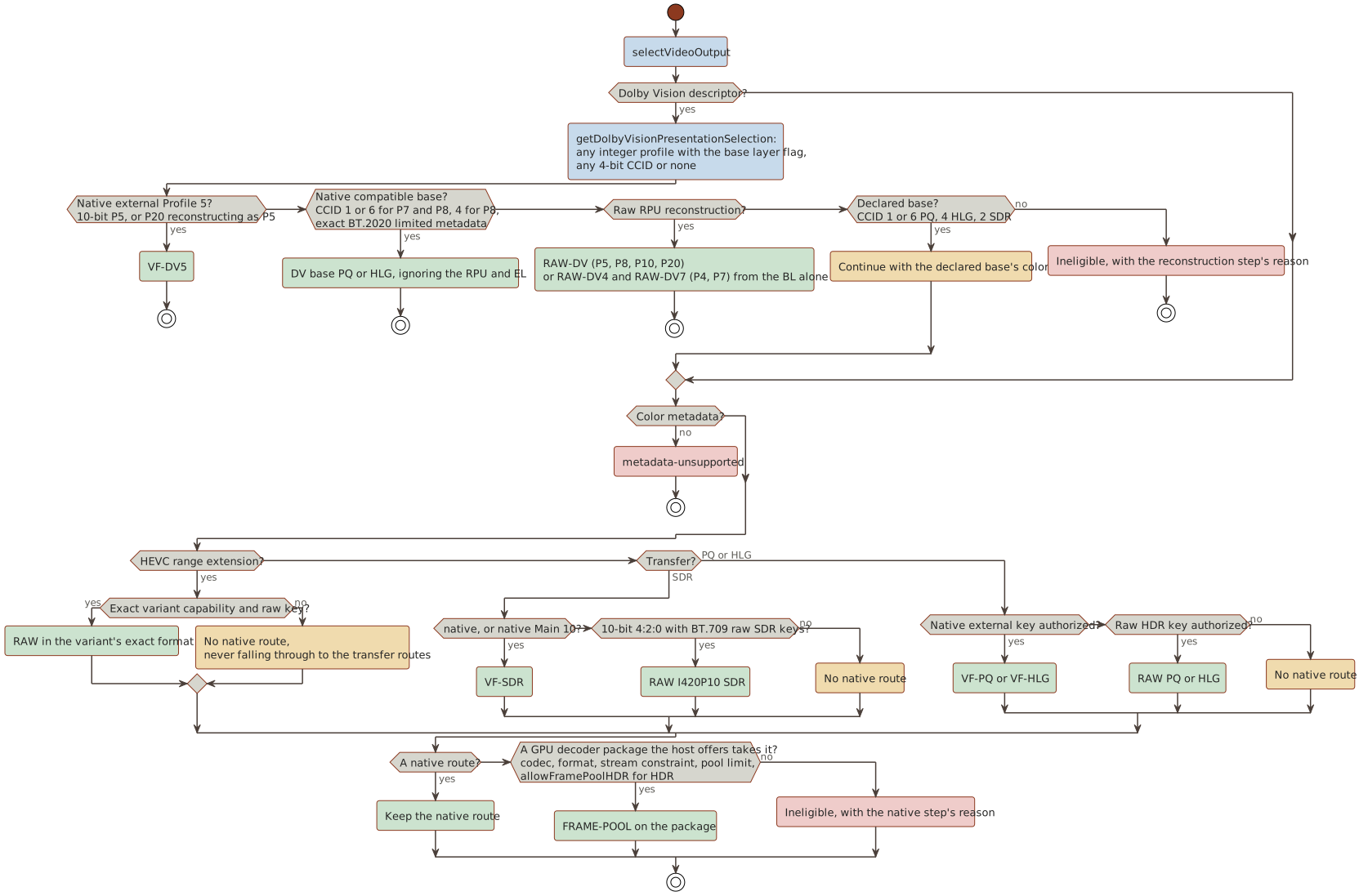
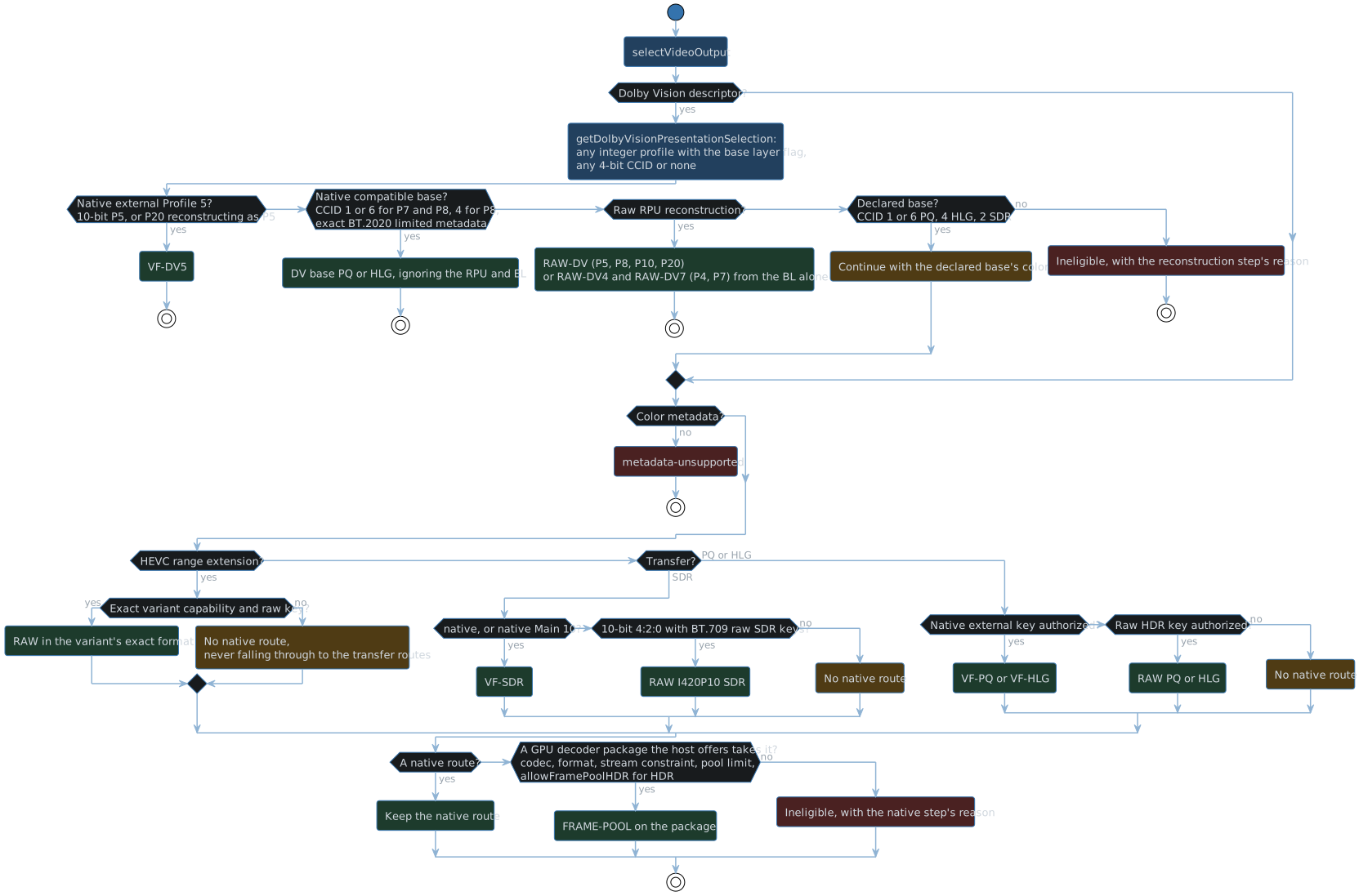
- A Dolby Vision descriptor.
PresentationInput.getDolbyVisionPresentationSelectionaccepts any integer profile with the base layer flag set, a valid bit depth, and any 4-bit compatibility ID (CCID) or none; the EL flag never rejects. The descriptor names the RPU route (reconstructionProfile): Profiles 4, 5, 7, and 8 as signaled; Profiles 10 (AV1) and 20 as 5 with CCID 0 or none and as 8 otherwise; none for Profile 9, the retired profiles, or a stream without an RPU. RPU reconstruction ignores the CCID, which only declares a base layer that can be shown on its own. The Dolby Vision routes, in order:- Native external Profile 5: a 10-bit HEVC P5, or a P20 that reconstructs as P5.
- Native external AV1 Profile 10 (
selectNativeAV1DolbyVisionOutput): a 10-bit Main P10 reconstructs as P5 or P8 from the hardware decoder’s frames, every sequence header neutralized to limited BT.709, whatever base the CCID declares. It needsnativeHDRAV1, the AV1 PQ external key, which proves the AV1 decoder’s frames import exactly, and the external key of the profile it reconstructs as:allowNativeDolbyVisionfor P5,allowNativeDolbyVisionProfile8for P8.getCustomPresentationEligibilityOptionswaits for the AV1 PQ key and the P8 key on first use. - The native compatible base, HEVC only, when the CCID declares one: HDR10 (1) or Ultra HD Blu-ray (6) for P7 and P8, and HLG (4) for P8. The RPU and EL are ignored. This needs exact BT.2020 limited base metadata with explicit transfer, primaries, and matrix. A separate-track P7 base is a standalone HDR10 track, so it qualifies whatever CCID the EL track reports.
- Raw RPU reconstruction.
The base layer decodes natively to
raw-planes: I420P10 for HEVC Main 10 and for AV1 Main at 10 bits, or the exact format of any range-extension variant or AV1 raw format variant, such as I420 for AV1 Main at 8 bits. HEVC Main at 8 bits has no native raw route, so its RPU route is ineligible. Single-layer routes (P5, P8, P10, P20) discard a signaled EL. No decoder decodes an EL, so dual-layer routes (P4, P7, HEVC only) reconstruct from the base layer alone: MEL is exact, and FEL presents its base layer. The worker still pairs a separate EL track to read its RPUs, and the presenter keeps its FEL composition for an EL decoder, which no route reaches. - The declared base layer (
getDolbyVisionBaseColorMetadata), through the ordinary steps below, where a GPU decoder’s RPU reconstruction (step 6 of this list) comes before the base’s own GPU route. CCID 1 or 6 declares PQ, 4 HLG, and 2 SDR, never for P5 or a P20 that reconstructs as P5. An explicit ColorTransfer must agree with the CCID; VideoRange and VideoRangeType are ignored. - Without a declared base, RPU reconstruction from a GPU decoder’s frame pool (see GPU decoders).
- Otherwise the source is ineligible, with the reason from the reconstruction step.
- No color metadata:
metadata-unsupported.PresentationInput.parseVideoStreamColorMetadatareads ColorTransfer, ColorPrimaries, ColorSpace, and ColorRange. A field that isunknown,unspecified, orreservedis absent and takes its transfer’s default: BT.709 for SDR, BT.2020 for PQ and HLG, and limited range. The BT.2020 10 and 12-bit transfers read as SDR, SMPTE 170M and SMPTE 240M primaries assmpte170m, BT.470 BG primaries asbt470bg, and the SMPTE 170M and BT.470 BG matrices as BT.601. Any other value is unrecognized and fails. - An HEVC range extension needs its exact variant capability and raw key, and so does AV1 outside Main 10 (High 4:4:4, Professional 4:2:2 or 12 bits), through
av1RawFormats[variant]. So does H.264 beyond 8-bit 4:2:0 throughh264RawFormats[variant]: a profile beyond High (High 10, High 4:2:2, High 4:4:4 Predictive, their Intra profiles, High 4:4:4, or CAVLC 4:4:4) whose pixel format is one of the five variants, I420P10, I422, I422P10, I444, or I444P10, and one the profile codes. The SDR keys go by matrix, primaries, and range, and 10-bit PQ or HLG takes the raw HDR key of the variant’s format. A range extension or a raw format variant never falls through to steps 4 and 5; a profile beyond High at 8-bit 4:2:0, 9, 12, or 14 bits, 4:0:0, or RGB has no variant and no other route, so it is refused. - SDR:
native, or native Main 10 SDR. Then, for 10-bit 4:2:0 SDR that neither decodes (AV1 Main, VP9 Profile 2, or HEVC Main 10 without native decode), raw I420P10 through the raw SDR key of its matrix, primaries, and range. JPEG 2000, MPEG-1, MPEG-2, VC-1, WMV3, MPEG-4 Part 2, H.263, and MS-MPEG4 have no native route (CUSTOM_PACKAGE_VIDEO_CODECS). - PQ or HLG: native external first, through the stream’s codec’s key (
external-hevc-main10-bt709-limited:<pq|hlg>-v1for HEVC Main 10,external-av1-main10-bt709-limited:<pq|hlg>-v1for AV1 Main at 10 bits), then raw (<I420P10|I420P12>:bt2020-ncl:bt2020:limited:<pq|hlg>). The worker rewrites the HEVC SPS VUI to BT.709 at the stream’s own range, or every AV1 sequence header, the codecs string, and anav1Cdescription to limited BT.709, so Chrome converts the hardware frame without tone mapping; each rewritten HEVC SPS must declare BT.2020 with the non-constant-luminance matrix and the route’s transfer, at either range, and each AV1 header limited BT.2020 with them, or the attempt fails. - When steps 3 to 5 chose no route, a GPU decoder package the host offers takes the stream, if one does; otherwise the source is ineligible with the reason those steps gave.
GPU decoders
The gpu backend decodes on the presenter’s device with a GPU decoder package’s WGSL; the frame-pool output presents its pool slots without a copy.
A package may carry a parser module (//! parser:), which the selection carries to the decode worker’s start as gpuVideoParser: the HEVC decoder project’s parser parses each packet into the GPU record its WGSL reads.
PresentationSetup.getGPUVideoDecoderOffers offers the host’s packages that accept the stream’s codec and write its output format, in the host’s order, with the presenter’s buffer limit; it verifies nothing.
selectGPUVideoOutput takes the first offer for the stream’s codec that meets each of these:
- The output format: a range extension’s own, else the one that holds the stream’s pixel format (
getGPUDecoderPixelFormatHolding: yuv422p is I422, and 9-bit samples take the 10-bit format, shifted up), else 4:2:0 at the stream’s bit depth. An explicit BitDepth must agree with the pixel format’s samples, and a pixel format no frame pool holds, such as RGB or 4:1:1, has no route. JPEG 2000’sxyz12le, the Digital Cinema profiles’ X’Y’Z’, takes I444P12, into which the JPEG 2000 package writes it as limited-range BT.709 Y’CbCr, so it needs a stream whose color metadata is BT.709 SDR at limited range, as an untagged stream’s is. - For a 4:0:0 pixel format, such as gray10le, which takes the 4:2:0 format of its depth: a decoder whose header declares
monochrome. - The decoder’s stream constraint, over the pool’s coded size and the format’s bit depth.
The pool takes the container’s coded size rounded up to 64 (
GPU_DECODE_POOL_CODED_SIZE_ALIGNMENT), the largest coding block, and the decoder’s header crops it, such as by a conformance window. A session may code larger, at the largest picture its parser declares (see How a session decodes), but eligibility checks the container’s size. - The frame pool, the decoder’s
stateandbuffer:s, and its packet ring each fit the device’s buffer limit (maximumBufferByteLength), the smaller of its largest buffer and its largest storage binding: the HEVC decoder project’s package holds 29 slots, which in I420P10 at 3840x2176 is about 727 MB.findGPUDecoderStreamFitFailurechecks them.
Static HDR needs allowFramePoolHDR, which the host sets when it tone-maps.
A Dolby Vision stream with an RPU route reconstructs on the route too, with dolbyVisionProfile set, when the host authorized that route (allowDolbyVision, allowDolbyVisionProfile4, or allowDolbyVisionProfile7, from the raw route’s key of the BL format) and an offer writes the format the RPU route names: the range extension’s own, I420 for HEVC Main, or I420P10 for HEVC Main 10 and AV1 Main at 10 bits.
allowFramePoolHDR plays no part in it.
The worker parses each packet’s RPUs, as on the raw route, a separate EL track’s included, and each frame carries its packet’s RPUs through the GPU decode session to the presenter; a repeat of the last good frame carries that frame’s.
The presenter reconstructs the slot through the raw route’s reconstruction (FramePoolDolbyVisionSignal.ts), gated by the same base key, and no frame pool holds an EL, so Profiles 4 and 7 reconstruct from their BL alone.
getGPUVideoDecodeTarget names the RPU route’s format, so a host fetches packages for a stream without a declared base.
hasEligibleCustomVideoRoute holds no offers, so a GPUVideoDecoderSummary (src/decode/video/gpu/GPUVideoDecoderCatalog.ts) stands in for one, after the offers, and selects the route without a decoder.
A summary names the package’s codecs and output formats, and may carry the package’s header and the buffer limit of the device a playback would decode on.
isGPUVideoDecoderSummaryFit judges the stream as an offer would: by codec and format, then with a header by monochrome for a 4:0:0 stream and the accepts conditions, and with a limit by the frame pool, state, buffer:s, and packet ring.
A summary without a header takes every stream of its codecs and formats, and leaves the other checks to the playback’s offers.
A package’s self-test vectors run only when a host calls verifyGPUDecoderPackage (see Decoder packages); eligibility never waits on them, and offering an unverified package is the host’s choice.
VP9, HEVC range extensions, and H.264 beyond 8-bit 4:2:0 present HDR only through raw planes, and AV1 keeps its raw route beside its native external one, so a host must settle the raw HDR keys for them whatever the external result.
The AV1 external keys authorize on first use: getCustomPresentationEligibilityOptions waits for the key of an AV1 HDR stream’s transfer before eligibility, through WebGPUPresenter.waitForExternalHDRRouteAuthorization.
The Dolby Vision keys a source needs on first use (Profile 4 in any format, or Profile 7 or single-layer reconstruction in a format other than I420P10) must settle before eligibility.
Interlaced video
Every route but Dolby Vision’s presents interlaced video through the deinterlacing pass (see Architecture), so eligibility refuses interlaced video only where no route can present it, as interlaced-video-unsupported:
IsInterlacedtrue on HEVC, which codes interlaced video as field pictures, and on JPEG 2000, which codes a codestream per field: no decoder weaves their fields into frames, and the pass deinterlaces frames whose rows alternate between the fields. The check runs before route selection, and the prefilter declines the same streams.- A Dolby Vision route, whose profiles are progressive and which never deinterlaces, unless
IsInterlacedis false. A Dolby Vision stream whose declared base layer takes an ordinary route presents through that route’s deinterlacing.
H.264, MPEG-2, MPEG-4 Part 2, VC-1, and WMV3 decode interlaced video into woven frames, so they are eligible whatever IsInterlaced says, and a missing or malformed IsInterlaced is an unknown scan, which each frame’s own fields settle.
MPEG-1, H.263, MS-MPEG4, VP8, VP9, and AV1 have no interlaced coding.
presentsInterlacedVideo(codec) exports the per-codec answer, so a host’s negotiation offers interlaced streams of exactly those codecs, outside its Dolby Vision labels.
| Route | Interlaced video | Field order from |
|---|---|---|
Native VideoFrame (external-texture, external-hdr) | Deinterlaced; the browser upsampled its chroma progressively | The container’s scan, else the host’s FieldOrder and IsInterlaced |
Raw planes (raw-yuv) | Deinterlaced, 4:2:0 chroma read within each field | As the native route; an H.264 raw format variant decodes through the same sample path as native H.264, so its frames carry the same fields |
GPU (frame-pool) | Deinterlaced, 4:2:0 chroma read within each field | The decoder’s reportPictureFields, else its parser’s parser_picture_fields, else as the native route |
Dolby Vision (external-dolby-vision, raw-dolby-vision) | Refused unless IsInterlaced is false | None |
Route keys
- Raw:
<I420P10..I444P12>:bt2020-ncl:bt2020:limited:<pq|hlg>and<I420..I444P12>:<matrix>:<primaries>:<full|limited>:sdr, with every matrix (bt709,bt470bg,smpte170m,bt2020-ncl) and primaries set (bt709,bt470bg,smpte170m,bt2020). The HDR keys and the BT.709 SDR keys are prewarmed; every other SDR key authorizes on first use, and its vector doubles the chroma excursion so the gamut conversion moves its samples beyond the tolerance. - External HDR:
external-hevc-main10-bt709-limited:<pq|hlg>-v1andexternal-av1-main10-bt709-limited:<pq|hlg>-v1, each with its own codec’s vector, authorize on first use, since they are the only keys whose check decodes a frame. The two HEVC keys start together, sharing one decode, when an HDR negotiation waits for them (waitForExternalHDRAuthorizationPrewarm) or a playback that requests the external HDR route starts them (prewarmExternalHDRPresentationAuthorization); an AV1 key starts when its route is first used. Device creation prewarms only the raw and Dolby Vision keys named prewarmed here. - Dolby Vision raw, each per BL format from I420 to I444P12:
<format>:dovi-rpu-v1,<format>:dovi-profile4-base-v1,<format>:dovi-profile4-fel-v1,<format>:dovi-profile7-base-v1, and<format>:dovi-profile7-fel-v1. OnlyI420P10:dovi-rpu-v1and the I420P10 Profile 7 keys are prewarmed; the others authorize on first use. - Dolby Vision external:
external-I420P10-bt709-limited:dovi-p5-rpu-v1, prewarmed, andexternal-I420P10-bt709-limited:dovi-p8-rpu-v1, which only AV1 P10 uses and which authorizes on first use; both check the same shader with their profile’s synthetic RPU.
Audio routes
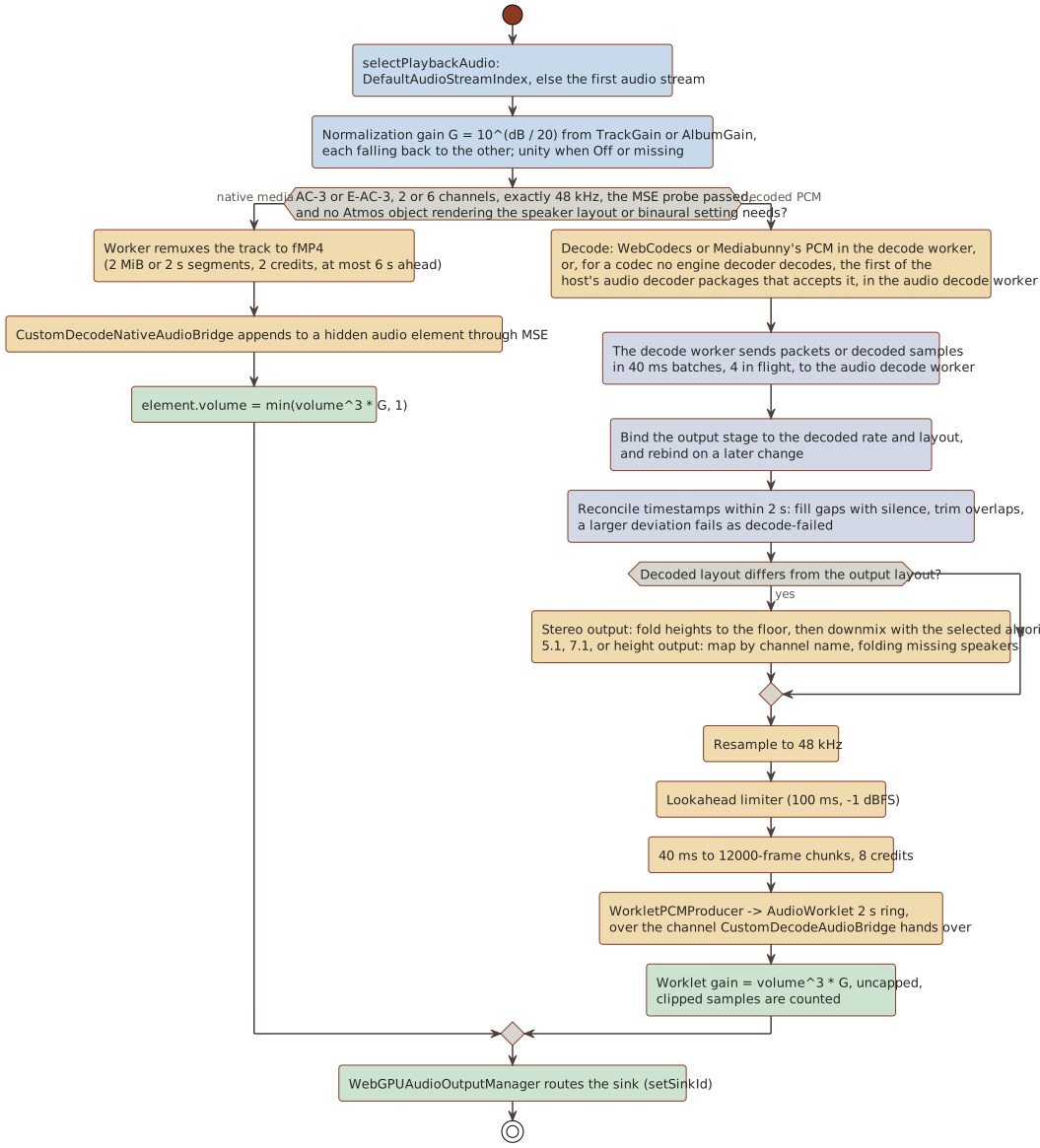
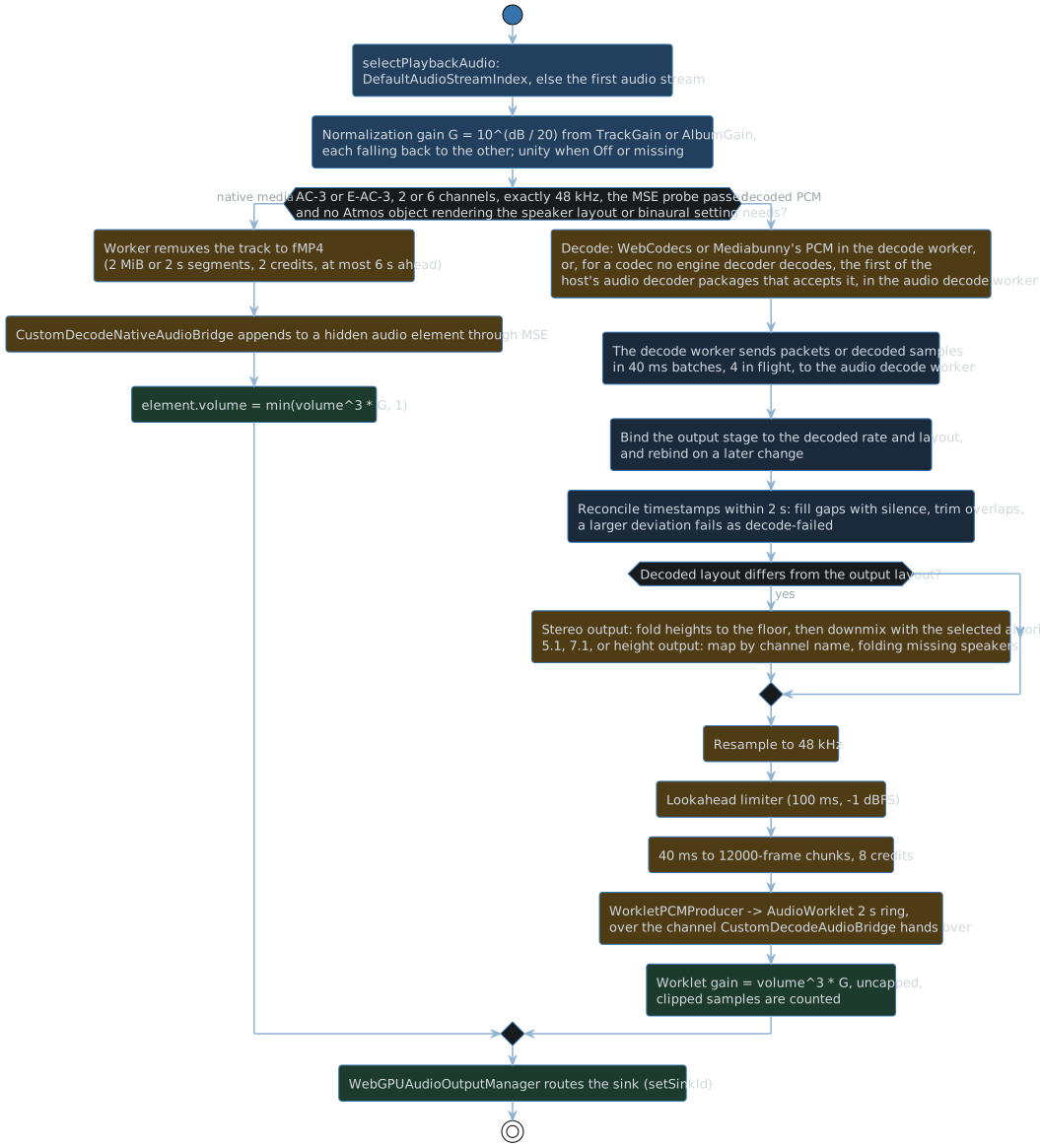
-
Track:
DefaultAudioStreamIndex, else the first audio stream by index. The worker selects it by its ordinal among the container’s audio tracks, which skips the streams Jellyfin lists for external files (IsExternal), as the video ordinal does. A selected external audio stream isaudio-track-external, since only the server can mux an external file in. Codec aliases: DCA is dts, EC-3 is eac3, TRUE-HD is truehd; WMA takes FFmpeg’s decoder names, wmav1, wmav2, wmapro, wmalossless, and wmavoice. -
Order: an E-AC-3 or TrueHD stream whose Jellyfin
Profilenames Atmos takes the first offered package that declaresrenderChannelMaskwhen the host’saudioRenderTargetneeds its objects: a height speaker layout, a floor wider than the declared channels (7.1 from a 5.1 core), or binaural headphones on a stereo layout; the declared layout must still pass the codec’s input routes, and the eligibility setsaudioRendersObjects. Otherwise the native-media MSE bridge for AC-3 and E-AC-3 (2 or 6 channels, exactly 48 kHz) comes first. Otherwisedecoded-pcm: through the engine’s own decoders when the codec capability and the input layout qualify, the browser’s for WebCodecs codecs and Mediabunny’s for PCM. A codec no engine decoder supports, AC-3, E-AC-3, DTS, TrueHD, MLP, and WMA among them, takes the first of the host’s audio decoder packages whose manifest accepts it. -
Input channels, as declared by Jellyfin. The decoded format is authoritative at runtime, and any decoded layout maps to the output by channel name:
Codec Channels PCM 1, 2, 3, 6 (3 needs a 3.0layout)aac, flac, opus, vorbis 1, 2, 3, 6, 8 (3 needs a 3.0layout, or2.1for FLAC, laid out by its mask; 6 needs the codec’s 5.1 verdict and 8 its 7.1 verdict)ac3 1, 2, 5, 6 (2/1 and 3/0 both arrive as 3.0, and no evidence covers either; 5 is 3/2,5.0(side))eac3 1, 2, 6, 8 mp3 1, 2 dts 1, 2, 3, 5, 6, 7, 8 (4.1 and 5.0 arrive with 5, 6.1 with 7) truehd 1, 2, 6, 8 (8 only at 48 kHz) mlp 1, 2 wmav1, wmav2 1, 2 wmapro, wmalossless 1, 2, 3, 6, 8 wmavoice 1 Jellyfin keeps only the part of FFmpeg’s layout name before
(, so3.0(back)arrives as3.0and7.1(wide)as7.1. A package reports each block’s speaker mask, so the mask, not the declared layout, tells them apart at runtime: a DTS 3.0(back) plays with its back center on the surrounds, and a mask with no output layout fails the attempt asdecode-failed, which renegotiates. DTS-ES’s XCh and a lossless 6.1 bed decode to the WAVE 6.1 mask, which plays with its back center split across the surround or back pair; a DTS 4.1 plays the same way, and a mask with no layout, such as 4.0, fails the attempt. Seven-channel WMA Pro and WMA Lossless still have no route, since their input table leaves 6.1 out. An 8-channel AAC, Opus, FLAC, or Vorbis track declares no mask, so it lays out by its count as WAVE 7.1 (CUSTOM_SEVEN_POINT_ONE_CHANNEL_LAYOUT), the order its 7.1 probe proved. FFmpeg’s encoder writes 7.1 AAC as AudioSpecificConfig channelConfiguration 7, which FFmpeg’s decoder, and so Chrome’s, reads as 7.1 with back and side pairs, not the specification’s 7.1(wide); either reaches the engine as7.1. -
DTS and TrueHD play from Matroska and from MP4, M4V, and MOV (the
DTS,dtsc,dtsh,dtsl, andmlpasample entries); MLP plays only from Matroska. -
WMA plays from Matroska
A_MS/ACMtracks and AVI and ASF streams, which Mediabunny leaves codec-less: the worker reads the WAVEFORMATEX (demux/WaveFormatAudioConfiguration.ts), names the codec by its format tag, and refuses a track whose tag names another codec than the package decodes it as. The package configures with that WAVEFORMATEX before its first packet (see Decoder packages). -
Rates: any positive integer, resampled to 48 kHz. Past 192 kHz the resampler’s kernel widens in proportion, so its band edge stays as sharp as at 192 kHz. A browser decoder judges its own rates per item, and a rate it refuses falls back.
-
Output layout (
audio/NativeMultichannelAudioOutput.ts):selectCustomAudioSpeakerLayoutresolves the host’s speaker layout setting ondestination.maxChannelCount:autotakes 7.1.4 from 12 channels, 7.1.2 from 10, 7.1 from 8, 5.1 from 6, else stereo; an explicit stereo, 5.1, 7.1, 5.1.2, 5.1.4, 7.1.2, or 7.1.4 needs a destination with its channels, else resolves asauto.selectCustomAudioOutputLayoutthen gives a source a package renders as objects the whole speaker layout, and every other source the floor rule within the layout’s floor: three channels, 5.0, and 5.1 take 5.1, 6.1 and 7.1 take 7.1 or fold into 5.1, everything else downmixes to stereo with the selected algorithm. A host may force stereo. A live layout switch applies the same rule to the decoded layout. The output plays 2, 6, 8, 10, or 12 channels in WAVE order (5.1 in Web Audio’s order); a decoded layout maps by channel name, a 5.0 bed fills 5.1 without its LFE and mixes to stereo as that 5.1, a height the output lacks folds into the floor pair beneath it, and a height layout mixes to stereo through its folded floor.
Gotchas
- Native decode uses the hint its probes measured (
getCustomDecodeHardwareAcceleration). Only the routes that present the decoder’s opaque hardware output (native external HDR, the native Dolby Vision base, and external Profile 5) prefer hardware. Raw-plane AV1 and VP9 prefer software, because Chromium’s hardware decoders return opaque 10-bit surfaces, and so does raw-plane H.264, whose profiles beyond High Chromium reports unsupported withprefer-hardware. Every other native route usesno-preference, so a codec without a hardware decoder, such as VP8 in Chromium on Windows, decodes in software. One exception: 10-bit SDR HEVC has no probe of its own. The native HDR HEVC probe gates it withprefer-hardware, while the SDR route requestsno-preference. Chromium decodes HEVC only in hardware, so both resolve to the same decoder. - Eligibility checks no audio profile: a stream a package cannot decode, such as DTS-UHD in a DTS package, fails its attempt at runtime as
decode-failed. - A raw SDR stream outside BT.709 primaries converts its gamut to BT.709 in the raw shader (
builtin.sdr-gamut), as the frame-pool route does, while the native VF-SDR route leaves the conversion to the browser.